Live Crew Map
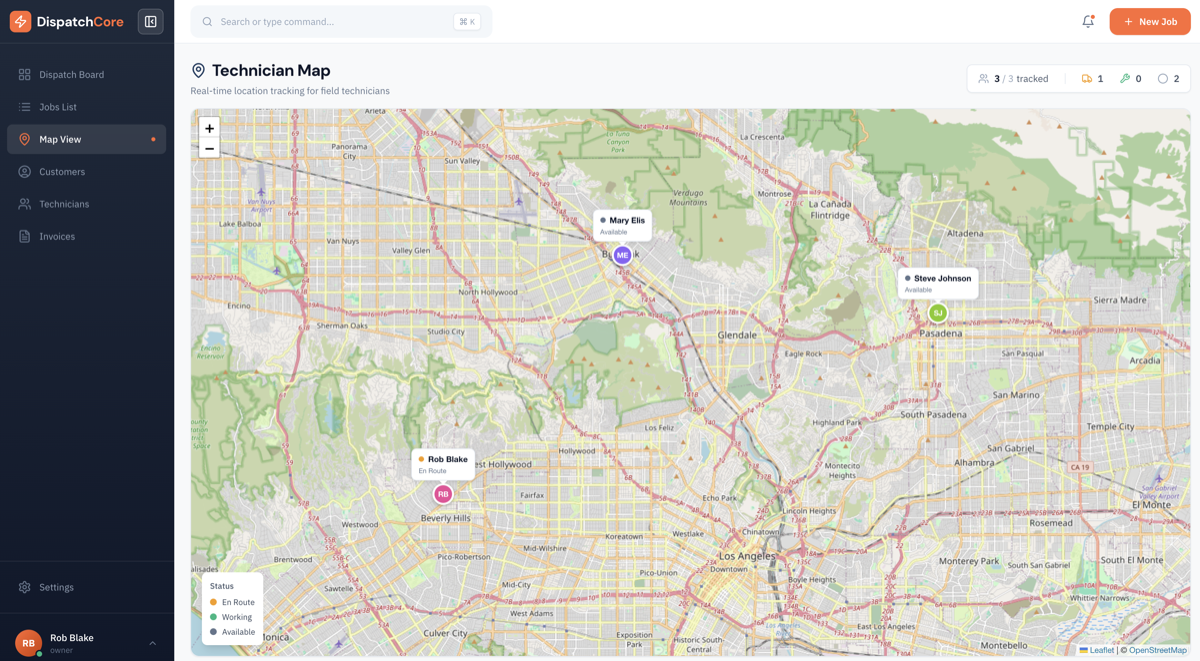
The Map page shows the real-time location of every active technician on a map. Each tech is represented by a marker showing their name and current status. This eliminates the need for "Where are you?" phone calls — you can see your entire crew's positions at a glance.
How Location Tracking Works
GPS locations are captured automatically when technicians update their job status from the mobile app. Each status change (En Route, Arrived, Completed) records the tech's current position. This means:
- You know when a tech left for a job
- You know when they arrived on site
- You know where they were when they completed the work
Location tracking is tied to job activity — there's no continuous background tracking. Techs' positions update when they interact with jobs, respecting their privacy while giving you the visibility you need.
Status Summary
The map view includes a status summary panel showing:
- Number of techs currently idle (available for dispatch)
- Number of techs en route to a job
- Number of techs on a job (in progress)
This gives you an instant picture of crew utilization without checking individual schedules.
Using the Map for Dispatch Decisions
The map is especially useful for dispatching emergency calls. When an urgent job comes in, you can:
- Open the map to see which techs are nearby
- Check which techs are idle or close to finishing their current job
- Assign the emergency to the closest available technician
This geographic dispatching reduces drive time and gets your team to emergencies faster.